$ sudo /Library/Application\ Support/VMWare Fusion/boot.sh –-restart
Showing posts with label Mac. Show all posts
Showing posts with label Mac. Show all posts
Monday, July 5, 2010
vmware fusion -- network no connection
The following tip can fix "network bridge device on /dev/vmnet0 is not running" failure.

Thursday, September 11, 2008
Macbook
My Macbook died a week ago, yesterday I got it back from west world who repaired it. The harddrive is changed, but all the data are lost.
I use all the systems (windows, Linux), but feel extremely addicted to Mac OS X. It mainly changed my way of surfing internet. Here is the trick:
1. delicouse2safari: save my delicious bookmarks to safari
2. Launchbar: rescan all the bookmarks, then I am ready to use.
The new Firefox (version 3.01) is released, yesterday I saw the new face on Mac for the first time, I don't feel it looks better than on the PC, but it works fine. I've been using vimperator for quite a while, it gave me quick access with firefox using vim-style key binding, but as the firefox3 pop up, I feel difficulty with vimperator. So I disable this add-on, hope the author of vimperator can improve it. (The most unhappy experience with vimperator, is I did not see tabs on the gui, although I can type "tabs" to show all the tabs in the buffer. I would like to see the tabs bar, not sure where the problem is)
I use all the systems (windows, Linux), but feel extremely addicted to Mac OS X. It mainly changed my way of surfing internet. Here is the trick:
1. delicouse2safari: save my delicious bookmarks to safari
2. Launchbar: rescan all the bookmarks, then I am ready to use.
The new Firefox (version 3.01) is released, yesterday I saw the new face on Mac for the first time, I don't feel it looks better than on the PC, but it works fine. I've been using vimperator for quite a while, it gave me quick access with firefox using vim-style key binding, but as the firefox3 pop up, I feel difficulty with vimperator. So I disable this add-on, hope the author of vimperator can improve it. (The most unhappy experience with vimperator, is I did not see tabs on the gui, although I can type "tabs" to show all the tabs in the buffer. I would like to see the tabs bar, not sure where the problem is)
Wednesday, February 20, 2008
setup a website - foyep.org
I spent a whole night to setup a new website, I feel I need to create a site on Buddhism (in Chinese). To register and setup my host account with Godaddy is so efficient, they are doing a great job.
RapidWeaver - I have fiddling it for a little while, liked or dis-liked, but it should be a top 10 Mac application. I used it to create and weave my pages and publish to my website, it also includes some nice and clean themes. The forum of RapidWeaver is quite good.
Ralf Simple Theme - A quite nice theme I choose when I don't want to use the default themes from RW.
webyep - I may feel sad with RW until I found the Webyep plugin, I have never imagen to use CMS but I like the idea, especially when I found it is developed by the guys who bring LaunchBar, while LaunchBar is so impressive to me and it is my #1 Mac Application.
Still need learning to fill the gap, but here is my website, still in construction.
RapidWeaver - I have fiddling it for a little while, liked or dis-liked, but it should be a top 10 Mac application. I used it to create and weave my pages and publish to my website, it also includes some nice and clean themes. The forum of RapidWeaver is quite good.
Ralf Simple Theme - A quite nice theme I choose when I don't want to use the default themes from RW.
webyep - I may feel sad with RW until I found the Webyep plugin, I have never imagen to use CMS but I like the idea, especially when I found it is developed by the guys who bring LaunchBar, while LaunchBar is so impressive to me and it is my #1 Mac Application.
Still need learning to fill the gap, but here is my website, still in construction.
Friday, December 21, 2007
emacs - malloc_jumpstart() error
After upgrade to OS X Leopard (Currently 10.5.1), the default emacs version fails to start. I checked with Google, and find out how to do it.
The problem is because my emacs version is still 21.X, need to update with dumpemacs.
The problem is because my emacs version is still 21.X, need to update with dumpemacs.
bash-3.2$ sudo mv /usr/bin/emacs-i386 /usr/bin/emacs-i386.orig
bash-3.2$ /usr/libexec/dumpemacs -V
22.1
bash-3.2$ sudo /usr/libexec/dumpemacs -d
Checking if emacs is up-to-date
emacs is not up-to-date. Needs dumping
...
bash-3.2$ emacs --version
GNU Emacs 22.1.1
Thursday, December 13, 2007
Mac - Terminal font

The default Terminal font on Mac is Monaco 10pt, but I am a little missed with the font with Linux (xorg 7.0), so I make a little search, to try some other fonts, and find the bitstream Vera Mono 10pt is quite the same with the Linux, and "bitstream-vera" is gnome's free font, so it is free for me to use. Great.
Download font to Mac is not very hard, First download the package of the font and open it which extracts the ttf file (I did it with FireFox), and with the Finder, I can open the ttf file by double click on the file itself, it brings up the font text demo with a button "install the font", so I just click on the button and it will do what it is supposed to do. Super easy!
Then with Terminal Preference, I can select the font to use, and should be enable "antialias text" (the default is disabled that makes the monospaced font ugly), and if I choose black as background, I have to change opacity to 100% as well.
Monday, December 3, 2007
gnu sed on mac
I found the default sed tool on my MacBook is a bsd version instead of the gnu version, and my Turing machine script can not run with the bsd sed:-(, there are too many differences, so I have to build gnu sed on my Mac.
First download the source code from here, currently I am using the version 4.1.4, and 4.1.5 is broken for "install_sh" dependency.
Build sed with:
Then sed is ready to use, but make sure the path /opt/markc/bin is in PATH environment.
First download the source code from here, currently I am using the version 4.1.4, and 4.1.5 is broken for "install_sh" dependency.
Build sed with:
./configure --prefix=/opt/markc
make
sudo make install
Then sed is ready to use, but make sure the path /opt/markc/bin is in PATH environment.
Thursday, November 29, 2007
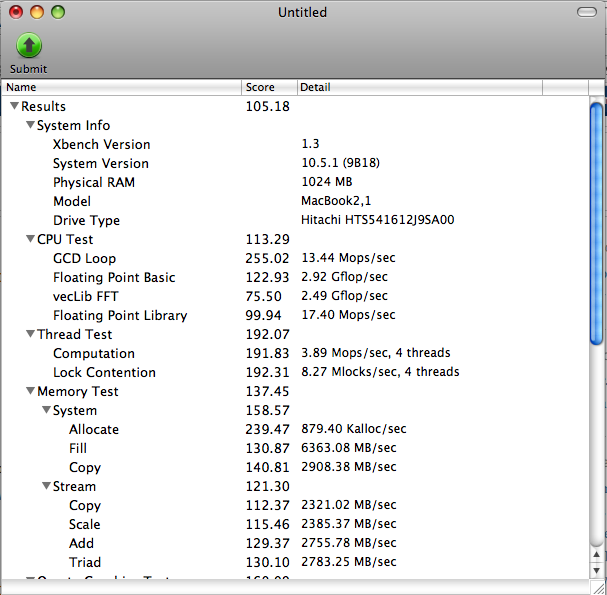
Wednesday, November 21, 2007
LaunchBar
I am using LaunchBar on my Mac, it is $20 for a single user, but it is worth for the cost, I see spotlight from Leopard can do the same kind of job as LaunchBar does, but I still choose LB on my everyday basis use because LaunchBar is more fast -- Actually I only use Mac at night after work.
Here is a video shows the basic usage of LaunchBar.
Here is my experience, basically I am using LB to launch applications, I can launch application from Finder Application directory, or click an application to run from the Dock but I don't want to a long list of applications in the dock, I want the dock to be simple. so I feel use LB is the best choice for me. The second thing with LB is browse the internet, I found LB remembers well bookmarks of Safari or Firefox, so if I wanna quick goes to the website I have to save the site to bookmarks of my Firefox as an example, otherwise LB will have no way to remember. But I am using delicous a lot, the hard thing for LB is it is not supported to the share society bookmarks, still did not try delicious2Safari (correct me if the name is not correct). There is some other beautiful functions by LB explained on the video, but I did not have a chance to use it.
At last, I think the experience will grows with using LB.
Here is a video shows the basic usage of LaunchBar.
Here is my experience, basically I am using LB to launch applications, I can launch application from Finder Application directory, or click an application to run from the Dock but I don't want to a long list of applications in the dock, I want the dock to be simple. so I feel use LB is the best choice for me. The second thing with LB is browse the internet, I found LB remembers well bookmarks of Safari or Firefox, so if I wanna quick goes to the website I have to save the site to bookmarks of my Firefox as an example, otherwise LB will have no way to remember. But I am using delicous a lot, the hard thing for LB is it is not supported to the share society bookmarks, still did not try delicious2Safari (correct me if the name is not correct). There is some other beautiful functions by LB explained on the video, but I did not have a chance to use it.
At last, I think the experience will grows with using LB.
Subscribe to:
Posts (Atom)